Detectify - Devices Detector05.08.26
Publisher Description


Detectify - hidden devices detector with Wi-Fi, Bluetooth, magnetic & IR tools.
Detectify hidden devices detector is a privacy inspection toolkit designed to help you check for unfamiliar electronics and hidden devices using Wi-Fi, Bluetooth, magnetic field and infrared camera tools.
With Detectify, you can scan spy bugs and nearby wireless devices, review unfamiliar Wi-Fi and Bluetooth devices, monitor magnetic field changes, inspect unusual infrared light sources and follow checks for common hiding places.
Hidden Devices Detector
Detectify combines multiple device detection and inspection tools in one app. Use Wi-Fi scanning, Bluetooth detection, magnetic field readings, IR camera inspection and manual checks to investigate unfamiliar electronics and wireless devices around you.
Wi-Fi Device Scanner
Scan devices visible on your connected Wi-Fi network and review available device information. Unfamiliar devices can then be checked more closely through physical inspection.
Bluetooth Device Detector
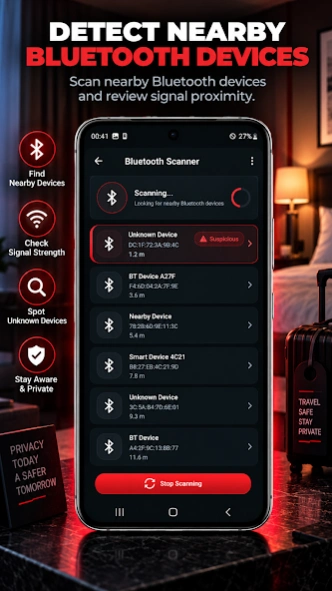
Detectify - Detect hidden devices helps you discover nearby Bluetooth devices and review approximate signal proximity. Select a device and monitor signal changes as you move around the area.
Bluetooth proximity is an estimate and may be affected by walls, interference, device hardware and surrounding conditions.
Magnetic Field Detector
Use your phone's magnetometer to check changes in magnetic activity around nearby objects. Detectify includes a magnetic field meter and live graph so you can monitor readings in real time.
Higher readings may also be caused by speakers, wiring, magnets, phones, appliances, metal objects and other electronics. Treat magnetic readings as indicators, not proof of a hidden device.
IR Camera Detector
Use your phone's camera and visual filters to inspect dark areas for unusual infrared light sources. Some cameras and electronic devices may emit IR light that can appear differently through a phone camera.
Results depend on your phone's camera hardware, lighting conditions and surrounding environment.
Hidden Camera Inspection
Detectify provides multiple tools for inspecting unfamiliar rooms for possible hidden cameras and electronic devices. Use the IR camera detector, Wi-Fi scanner, Bluetooth scanner and magnetic field detector together with careful physical inspection.
Bluetooth Proximity Tracking
Select a nearby Bluetooth device and follow changes in approximate signal proximity while moving around.
Manual Inspection Guides
Detectify includes practical hidden device inspection guides for bedrooms, hotels, restrooms, changing rooms and other spaces. Combine manual inspection with wireless, magnetic and infrared tools.
Detectify - Device Detector Features
• Hidden device detector
• Wi-Fi device scanner
• Bluetooth device detector
• Hidden device inspection tools
• Bluetooth Scan
• Magnetic field detector
• Live magnetic field graph
• IR camera detector
• Infrared camera inspection filters
• Hidden camera detection tools
• Manual inspection guides
How to Use Detectify
1. Choose an inspection tool.
2. Scan nearby Wi-Fi or Bluetooth devices.
3. Move your phone slowly around objects with the magnetic field detector.
4. Use the IR camera detector in lower-light conditions to inspect unusual infrared light.
5. Review unfamiliar devices or readings and physically inspect anything that appears unusual.
6. Use multiple Detectify tools instead of relying on one detection method.
Can Detectify Find All Hidden Devices?
No phone-based hidden device detector can guarantee detection of every hidden device.
Detectify can help you investigate wireless devices, magnetic field changes and infrared light sources. Results depend on your phone's sensors, camera hardware, wireless environment and surrounding conditions.
Important Information
A Wi-Fi or Bluetooth device, magnetic field reading or infrared light source does not by itself confirm the presence of a hidden camera or surveillance device.
Always verify unfamiliar devices and suspicious findings through careful physical inspection.
About Detectify - Devices Detector
The company that develops Detectify - Devices Detector is WonderTech Studio. The latest version released by its developer is 05.08.26.
To install Detectify - Devices Detector on your Android device, just click the green Continue To App button above to start the installation process. The app is listed on our website since 2026-08-04 and was downloaded 206 times. We have already checked if the download link is safe, however for your own protection we recommend that you scan the downloaded app with your antivirus. Your antivirus may detect the Detectify - Devices Detector as malware as malware if the download link to com.wondertechstudio.hiddendevicedetectorandcameradetector is broken.
How to install Detectify - Devices Detector on your Android device:
- Click on the Continue To App button on our website. This will redirect you to Google Play.
- Once the Detectify - Devices Detector is shown in the Google Play listing of your Android device, you can start its download and installation. Tap on the Install button located below the search bar and to the right of the app icon.
- A pop-up window with the permissions required by Detectify - Devices Detector will be shown. Click on Accept to continue the process.
- Detectify - Devices Detector will be downloaded onto your device, displaying a progress. Once the download completes, the installation will start and you'll get a notification after the installation is finished.
Program Details
System requirements
Download information
Pricing
Version History
version 05.08.26
posted on 2026-08-04
• Completely redesigned interface with a cleaner, more modern look.
• Refreshed layouts across the app for a more consistent experience.
• Improved navigation, spacing, and visual clarity.
• Better support for portrait and landscape mode.
• Enhanced edge-to-edge display and overall UI polish.
• Optimized compatibility for Android 16.
• Improved stability, performance, and bug fixes.
Thanks for using Detectify!
version 14.11.25
posted on 2025-11-13
• Reduced ads for a smoother experience
• Improved layout and UI consistency
• Updated libraries for better stability
• Fixed minor bugs and optimized performance
version 29.08.25
posted on 2025-08-28
- Fixed delay in cold start for faster app launch
- Added support for Android 15
- Improved layout and design
- Minor bug fixes and performance improvements
version 05.07.25
posted on 2025-07-05
- Optimised for better compatibility with Android 15
- Bug Fixes to improve performance
- Enhanced Layout for better user experience
version 08.04.25
posted on 2025-04-08
📡 Added Nearby Device Detector using Bluetooth to help locate suspicious nearby devices
🚀 Enhanced the Wireless Device Detector for faster and more accurate scanning
🧲 The Hidden Devices Detector now includes Raw Data, Meter, and Graph views for better representation and analysis
🔧 Fixed bugs in the IR Hidden Camera Detector Free feature for more reliable detection
📘 Updated the How to Use section — now more detailed, comprehensive, and easier to follow
📦 Updated internal libraries
version 03.11.24
posted on 2024-11-03
- Bug Fixes: Resolved an issue that was affecting IR detection filters in the previous release.
- Performance Improvements: Optimised filter handling for a faster and reliable experience.
version 10.08.24
posted on 2024-08-10
In this version we have added:
- Wireless Camera Detection: Introducing a powerful new feature to detect wireless cameras.
- Enhanced IR Camera Detection: New filters for improved infrared camera detection.
- Added Android 14 Support
- Updated Libraries for better performance and stability.
- How To Use Section: We have added a detailed how to use section for better understanding of app's features
- Bug Fixes: We have improved stability by removing bugs and crashes from previous versions
version 18.07.24
posted on 2024-07-17
In this version:
- We have added new Meter for Device Detection
- We have improved the Tips Section with more insightful Hidden Devices Detector
- We have Added support for Android 14
- We have Updated libraries for better performance
- We have added more details in the How To Use Section of the app
- We have improved Devices Detector Layout
version 07.05.24
posted on 2024-05-06
This Update Includes:
- Improvement in layout
- Detailed Instructions about the features
- Improved Performance
- Minor Bug Fixes
version 08.01.24
posted on 2024-01-08
In this version:
- We have updated libraries for improved functionality
- We have fixed some minor bugs for better performance
